
Fake Strava map: how to create one without running
Ever wished your Strava map looked epic without even tying your shoelaces? That is exactly where the idea of a fake Strava map comes in. Instead of recording a real run or ride, you upload a realistic GPX file that tells Strava you went somewhere awesome, at a believable pace, with a route that looks totally legit.
Maybe you want to “run” around Central Park while you are actually at home. Maybe you want to draw a giant cat, a heart, or your initials on the map. Or maybe you just want to test a new GPS watch or fitness app without planning an entire workout. A fake Strava map lets you do all of that in a fun, controlled, fully digital way.
The good news: you do not need shady GPS spoofing apps, weird hacks, or a friend secretly running for you. Tools like SimuRun let you generate realistic GPX files directly in your browser, with natural-looking routes, human pacing, elevation changes, and even simulated heart rate if you want extra realism. You set the distance, the pace, the activity type, the start time, then download a GPX file that looks like it came straight from a real GPS watch.
In this guide, you will learn what a fake Strava map actually is, why people love creating them, and how to build your own in a few clicks using a realistic GPX generator instead of manual hacks. We will also cover fun ideas for GPS art, content creation, and harmless pranks, plus a few simple rules to keep everything ethical and drama free. 😇
By the end, you will know exactly how to design a fake Strava map that looks real on Strava, Garmin, Komoot, and other platforms, while keeping the focus on creativity, testing, and storytelling rather than cheating.
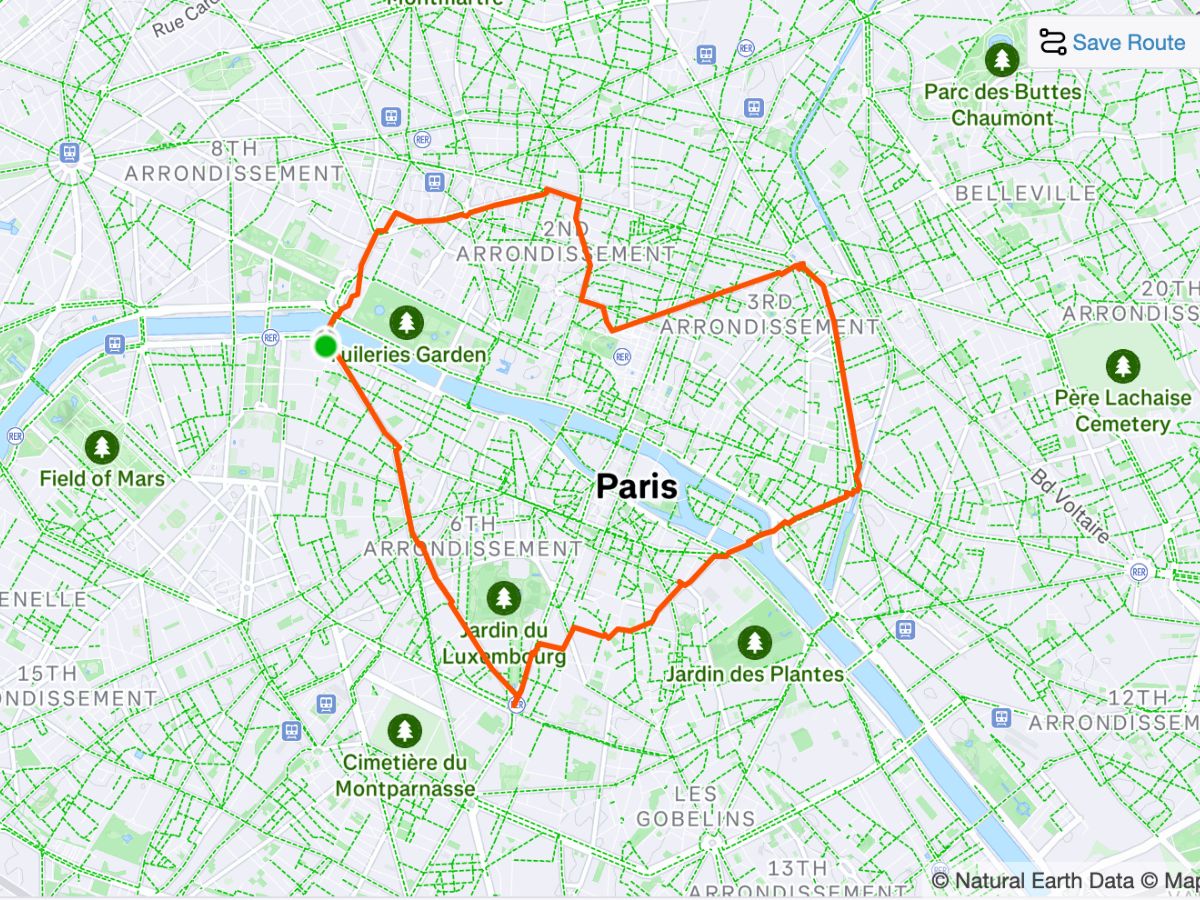
What is a fake Strava map, exactly?
A fake Strava map is a GPS activity that looks like a real run or ride, but was created from a simulated GPX file instead of a live recording. On Strava, it still shows distance, time, pace, elevation, and a clean route on the map. The data looks normal. The only difference: it was generated, not tracked by your watch.
Think of it as a GPS special effect. 🎬 The map, pace, and route shape look natural, but the activity exists only because you created the file and uploaded it. No sweat, no route planning, no need to step outside.
Fake Strava map vs fake Strava run
It is easy to mix the two:
- A fake Strava run focuses on the performance: distance, pace, duration.
- A fake Strava map focuses on the visual: the shape of the route on the map, the place, the story it tells. 🗺️
Both rely on the same idea – a simulated GPX activity – but the intention is slightly different:
- With a fake run, you might want to simulate a realistic training day.
- With a fake map, you might want to create GPS art, fake travel, or a route that would be impossible (or annoying) to run in real life.
If you want to go deeper into fake runs in general, you can also read your “Fake my run: create realistic GPS runs online” article on the No Sweat Blog.
Is it ok to use a fake map on Strava?
Short answer: it depends how you use it.
A fake Strava map is totally fine when you use it for:
- Content creation (TikTok, Reels, YouTube, fun posts) 📱
- Testing a GPS watch or a new fitness app
- GPS art and creative routes 🎨
- Private jokes and playful pranks with friends
It becomes a problem when someone uses fake data to:
- cheat in official races or time-based challenges,
- climb leaderboards or win prizes with a fake activity. 🏆
SimuRun is built for creativity, demos, and testing, not for gaming rankings. Using a fake Strava map as a digital playground is cool. Using it to pretend you won a serious competition is not.
Why people love creating fake Strava maps
Not everyone cares about running a personal best. A lot of people just want their Strava map to tell a cool story. That is why fake Strava maps are becoming a kind of playground for runners, cyclists, creators, and tech lovers. Each group uses them a bit differently, but the core idea is the same: have fun with the map. 😏
For content creators and influencers
If you make videos for TikTok, Reels, or YouTube, you know that a strong visual hook is everything. A fake Strava map is perfect for that:
- a route that “travels” through a whole city in one clean line,
- a fake marathon in a famous place while you are actually at home,
- a series of weird or surprising maps that your followers try to decode.
You can use SimuRun to generate a realistic GPX file, upload it to Strava, then screen record or screenshot the map for your content. Add music, captions, a bit of context, and you have a mini GPS story that stands out in the algorithm. 🚀
The best part is that you stay in control: you decide the distance, the intensity, the duration, and the overall shape, without having to plan or complete the actual route.
For GPS artists and map nerds
Some people love to draw with their legs. Others prefer to draw with data.
If you are into GPS art, a fake Strava map is a super flexible tool. Instead of spending hours designing a path that might not even be runnable, you can:
- sketch an idea (a heart, an animal, initials),
- turn it into a believable route with a simulated GPX,
- upload it as a Strava activity and see the drawing come to life on the map. 🎨
Because the movement is simulated, you can create shapes that would be:
- hard to follow in real life (too many turns, dead ends, private areas),
- located in places you cannot easily access (another city or country).
It is a way to explore creative maps without the constraints of geography or traffic.
For testers and tech lovers
Not everyone wants to joke or draw. Some people just love playing with their tech.
A fake Strava map is very useful if you want to:
- test a brand new GPS watch or bike computer,
- check how a fitness app handles imported activities,
- try automation, integrations, or data visualizations without having to record a real workout. 🧪
Instead of going outside for every test, you can generate:
- a short, simple 2–3 mile test run,
- a longer 8–10 mile “mock long run” with some elevation,
- a couple of different fake routes to see how the device or app behaves in different scenarios.
With SimuRun, you get realistic data patterns, so you can see how your tools handle pace changes, hills, or longer distances.
For a deeper focus on values and pacing, your article “How to create a fake Strava pace (the fun and ethical way)” fits perfectly as a follow-up.
For playful pranks and private jokes
Finally, there is the pure fun side. A fake Strava map is an easy way to:
- “flex” with a fake ultra that your close friends immediately recognize as a joke,
- post a totally impossible route, like running across the ocean,
- create a “secret message” in GPS art only visible to people who zoom in.
Used this way, fake Strava maps are just inside jokes in GPS format. You are not trying to fool the whole world or win something. You are just having fun with your circle, your club, or your followers.
As long as you stay away from leaderboards and official challenges, this kind of playful use keeps the spirit of the sport intact while adding a layer of creativity. 😄
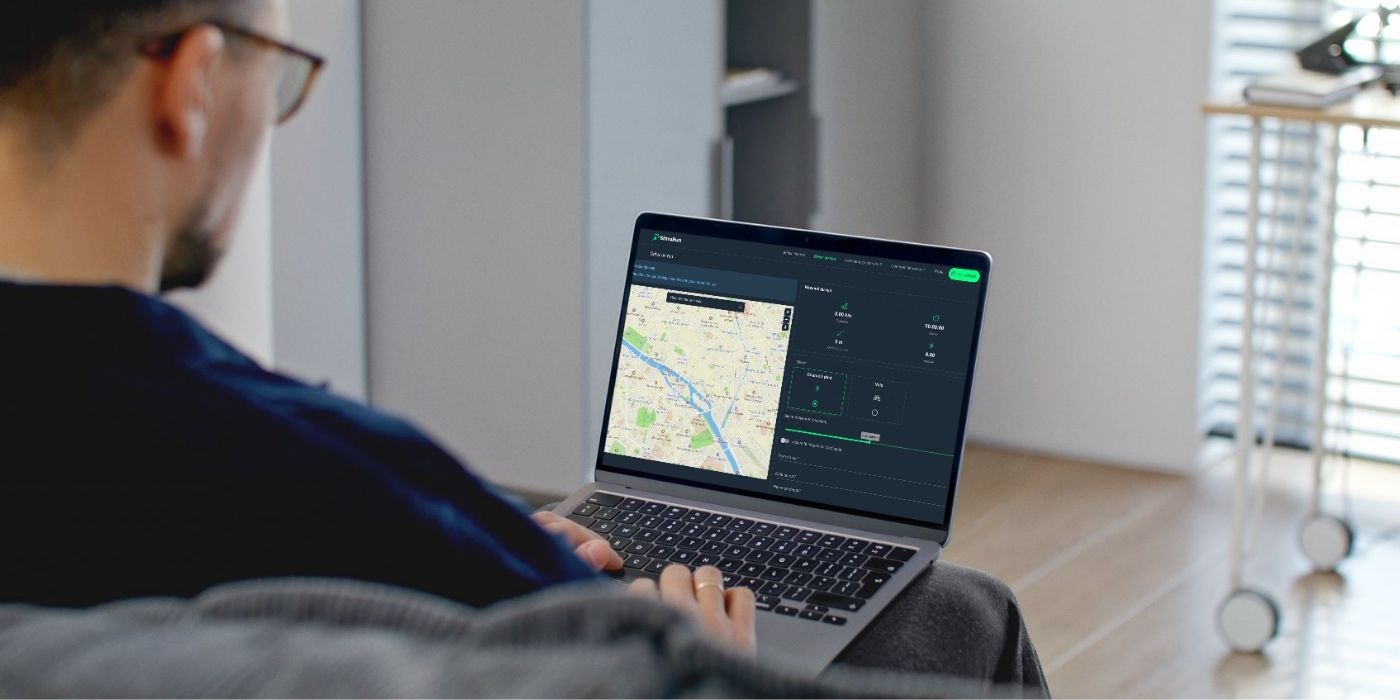
Common ways to build a fake Strava map (and their limits)
Before you use a dedicated tool, it helps to know how people usually create a fake Strava map. Most methods work in theory, but they are often messy, technical, or risky. Here is what many users try first – and why they usually end up looking for something simpler.
Editing a GPX file by hand
The “pure geek” method is to open a GPX file and edit the data yourself.
You start with a real activity or a template file, then:
- open it in a text editor or GPX editor 🧑💻,
- move or add GPS points,
- adjust timestamps, speed, and elevation,
- save the file and upload it to Strava.
It sounds powerful, but in practice it is:
- slow: you spend ages tweaking coordinates and timestamps,
- technical: you need to understand how GPX structure works,
- fragile: one small mistake can make the file invalid or obviously fake.
You also have to think about:
- realistic changes in pace,
- believable pauses and turns,
- smooth elevation instead of random spikes.
If you only want a fun fake Strava map or a quick test file, hand-editing GPX is usually overkill. It feels more like work than play.
Using GPS spoofing apps
Another common path is to look for GPS spoofing apps that fake your location in real time. These tools pretend your phone is somewhere else, so any tracking app records a route you are not actually running.
On paper, that might sound handy, but in reality:
- you often need to unlock developer options or change system settings,
- many apps are full of ads, bugs, or sketchy permissions,
- it can go against the terms of service of some platforms,
- the route can look weird, with jumps, straight lines, or unrealistic movement. 🚫
More importantly, GPS spoofing tries to trick the system live. That is not the spirit here. A fake Strava map made for fun, testing, or art does not need to pretend you are somewhere in real time. It just needs a clean, realistic GPX file you can upload afterward.
So while spoofing exists, it is usually:
- too complex,
- too fragile,
- and not aligned with a transparent, playful use of fake activities.
Asking someone else to run for you
The “old-school” method is simple: someone else runs, then sends you the file.
You might ask:
- a friend who lives in a different city,
- someone on your team,
- or a runner you pay to record specific routes.
They do the workout, export the activity, and send you the GPX file. You upload it, and you get a “fake” map in the sense that you did not run it yourself.
It can work, but there are clear limits:
- it is slow: you depend on another person’s schedule,
- it is hard to control: they might change the route or pace,
- it is not scalable: every new idea needs a new real-world run,
- it can create awkward questions if people think you claim the effort as yours. ⚠️
For a fun deep dive into this idea, your “Strava mule” article on the No Sweat Blog is the perfect companion.
These three methods prove one thing: creating a fake Strava map is possible in many ways, but most of them are too technical, too risky, or too slow for everyday use.
That is why having a dedicated GPX simulator in your browser feels so different: you stay in control, you do not hack anything, and you can focus on the fun part – designing the map you actually want.
The easy way: generate a fake Strava map with SimuRun
This is where things finally get fun. 😏
Instead of editing GPX files by hand or using risky GPS spoofing apps, you can create a realistic fake Strava map in just a few clicks with SimuRun.
No installs. No hacks. No coding.
Just a browser… and an idea.
What SimuRun does for you
SimuRun is a realistic GPX generator.
It creates GPS activities that look like they were recorded by a real runner or cyclist.
You choose your settings:
- activity type (run or bike)
- distance
- pace or speed
- start time and date
- optional extras like heart rate for added realism
SimuRun then generates a clean, natural-looking GPX file with:
- human pacing variations,
- smooth elevation changes,
- route shapes that look like real outdoor paths.
You then download the file using credits (no subscription), and upload it to Strava, Garmin, Komoot, or any fitness platform that supports GPX.
It feels simple because it is simple.
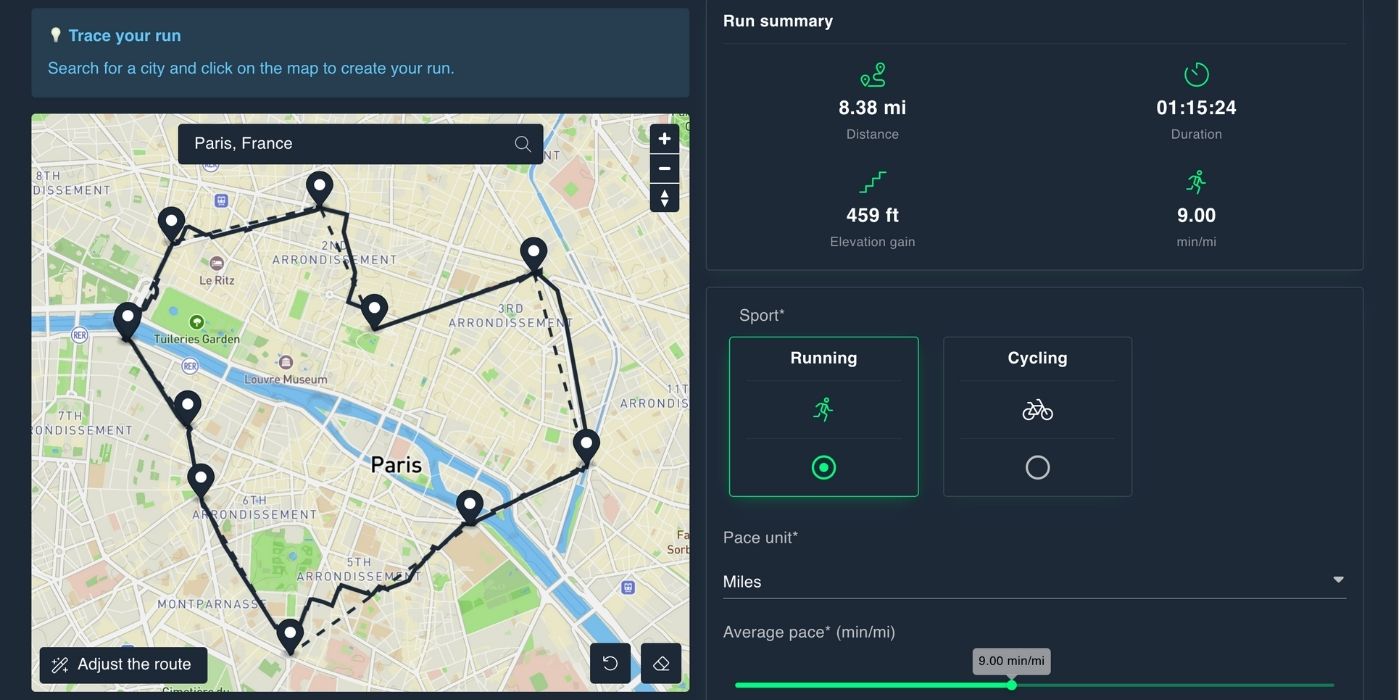
From idea to fake Strava map: step-by-step
Here’s exactly how it works:
- Open SimuRun in your browser.
- Select run or bike.
- Enter your distance, pace, and start time.
- Click to generate your simulated route.
- When you like the result, use your credits to download the GPX file. 💳
- Upload it to Strava as a normal activity.
That’s it. Your fake Strava map appears in your feed with distance, time, pace, and the full route. 🚀
It looks real — because the data follows real patterns.
Why SimuRun creates a believable map
A believable fake Strava map needs:
- human-like pacing (small ups and downs, not a flat line)
- plausible elevation based on typical routes
- non-robotic shapes with curves and natural movement
SimuRun is designed for exactly that.
It produces data that looks like something a human could do — even if you didn’t do it this time.
And only the people you tell will know it’s simulated. 😉
If you want an overview of everything SimuRun can do beyond maps, the article “Fake Strava generator: the smart, fun way to create realistic GPS runs” is a great complement.
Fun fake Strava map ideas you can try
Once you know how to generate a fake Strava map, the real question becomes:
What should you create? 😏
Here are some of the most fun and popular ideas.
GPS art and shapes
One of the most iconic uses of fake Strava maps: GPS art.
You can create:
- a heart for Valentine’s Day ❤️
- a smiley face for a “good vibes only” post 🙂
- your initials
- a simple animal (cat, bird, fish)
- a lightning bolt ⚡
Because the movement is simulated, you don’t have to worry about dead ends, private streets, or messy turns. You just focus on the shape.
You can also:
- create a weekly series,
- mix shapes and distances,
- or combine multiple activities into one big drawing. 🎨
GPS art becomes way easier when the map does what you want.
City-flex routes (“Wait… where did you run?”)
Another fun idea: create a route in a place you’re not even in.
For example:
- a full loop around Central Park,
- a scenic run near the Golden Gate,
- a tour through a famous neighborhood,
- a “travel run” in a city you love. 📍
You’re not lying — you’re storytelling.
People see the map and instantly stop scrolling.
Storytelling challenges over several days
A fake Strava map does not have to be a single stunt.
You can build multi-day stories, like:
- Day 1 → the letter H
- Day 2 → the letter I
- Day 3 → a heart
Or reveal parts of a larger drawing one day at a time.
Because SimuRun generates GPX files fast, you can test multiple versions before choosing the one that fits your concept.
It’s GPS creativity on your terms. 🎨✨
Keeping your fake Strava map fun and ethical
Whenever you talk about fake Strava maps, one question always comes up:
Is this cheating?
The answer depends on how you use it.
Where the line actually is
It’s totally fine for:
- fun, jokes, memes
- testing GPS watches and apps
- creative maps and GPS art
- storytelling and content 😇
It becomes a problem if you use fake data to:
- claim a race result,
- win a prize,
- climb leaderboards,
- beat other athletes unfairly. 🏅
SimuRun is made for fun, creativity, and demos — not cheating.
Using it the right way keeps the sport enjoyable for everyone.
Simple tips to stay transparent (if you want)
You don’t have to announce every fake map, but if you want clarity:
- Add “simulated route” or “GPX test” in the title
- Mention SimuRun in the description
- Use fake activities mainly on your creator/testing profile
- Avoid uploading them into competitive challenges
This keeps the spirit clean without ruining the fun. 😇
FAQ: fake Strava map questions, answered
Is a fake Strava map legal?
Yes. You’re just uploading a GPX file you generated yourself.
Problems only appear if you use it to cheat in competitions or prize-based challenges.
Can Strava detect a fake GPX?
Strava does not flag GPX files as “fake” by default.
What can look suspicious is:
- impossible speeds,
- straight lines across oceans,
- teleport-like jumps,
- robotic pacing.
This is why a realistic GPX generator like SimuRun helps.
Can I use a fake map for a race?
You can upload it technically — but you shouldn’t.
That’s cheating.
What is the easiest way to create a fake Strava map?
Using a realistic GPX generator like SimuRun.
No hacks. No installs. No scripts. 🚀
Can I create GPS art with a fake Strava map?
Yes — and it’s one of the most fun uses.
You can test shapes, adjust distances, and design maps you could never run in real life.
🏁 Conclusion: turn your fake Strava map into a story
A fake Strava map is more than a digital trick.
It’s a way to turn GPS data into a story, a joke, a drawing, or a test. Used well, it becomes a creative tool that gives you more freedom than any real run could.
Throughout this guide, you’ve seen how fake maps can help you:
- create fun visuals for social media,
- experiment with GPS art,
- test devices and apps,
- make playful pranks with your friends. 😏
Manual GPX editing is too technical. Spoofing apps are messy.
And asking someone else to run for you is slow and awkward.
What you actually need is a simple and transparent tool that generates a realistic GPX file you can upload in seconds.
That’s exactly what SimuRun delivers: believable simulations, creative freedom, and zero complications. 🚀
If you want to try your first fake Strava map:
- open SimuRun,
- create a realistic GPX route,
- upload it to Strava,
- and share it with your friends or audience.
Simulate the effort. Keep the fun. Let the map tell the story. 😏