
GPS art generator: create creative routes easily
You open Strava.
You scroll past pace charts and mile splits.
And then… you stop.
A run map shaped like a heart.
A word perfectly drawn on city streets.
A clean, creative GPS route that instantly stands out.
That’s not luck.
That’s GPS art.
And behind most of those eye-catching maps, there’s a simple tool doing the heavy lifting: a gps art generator.
A gps art generator lets you design creative GPS routes in advance, turn them into GPX files, and upload them to fitness apps. No wandering for miles. No messy GPS tracking. Just clean lines, realistic distances, and routes that look exactly how you imagined.
GPS art is everywhere right now because:
- it breaks the routine of boring run maps
- it turns GPS tracking into something visual
- it makes your activity feed instantly more interesting
And just to be clear.
This isn’t about cheating races or gaming leaderboards.
GPS art is about creativity, testing, and having fun with maps 😏
In this guide, you’ll learn:
- what a gps art generator really is
- how it works with GPX files and GPS routes
- what kind of creative maps you can generate
- and how SimuRun helps you create realistic GPS art routes in minutes
Simulate. Create. Share.
Let’s see how GPS art really works 🚀
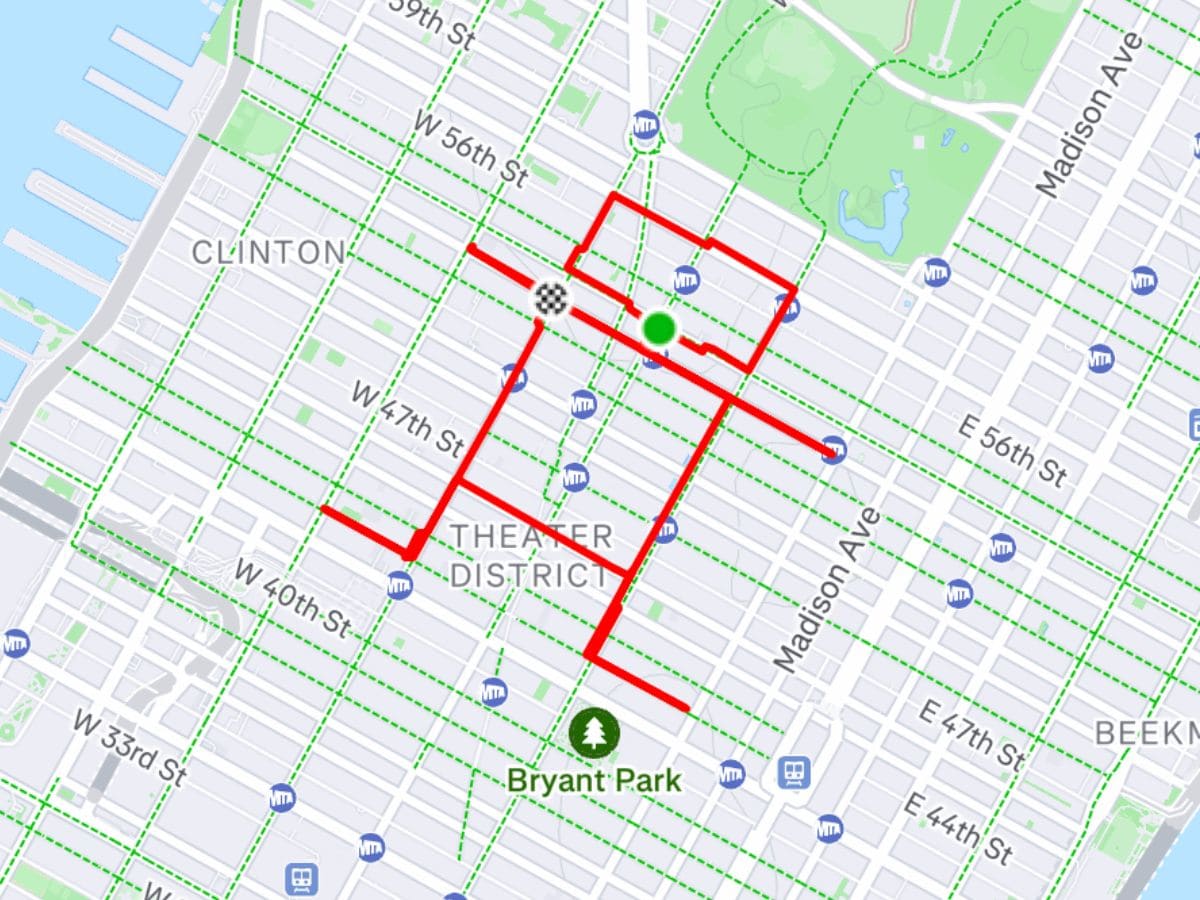
What is a GPS art generator?
A gps art generator is a tool that lets you create artistic GPS routes on purpose, instead of relying on random tracking.
In simple terms:
- you design a route with a specific shape, word, or symbol
- the tool turns that route into a GPX file
- you upload the file to your favorite fitness app
- the map appears exactly as planned
No guesswork.
No zig-zag mistakes.
No wasted miles.
Without a generator, GPS art usually means running for miles, hoping your GPS signal stays perfect and the shape looks right in the end. Most of the time, it doesn’t.
With a gps art generator, the route is planned first, then executed digitally.
That’s the key difference.
Instead of:
- wandering streets
- fixing broken lines
- dealing with messy GPS data
You get:
- clean GPS routes
- consistent distances
- maps that actually look like your idea
If you’re curious about how GPX files make this possible, our article on fake Strava maps and GPX routes explains why importing a planned route always beats improvising with live tracking.
A gps art generator doesn’t replace creativity.
It unlocks it.
You focus on the idea.
The tool handles the GPS logic 😏
Why GPS art is so popular on Strava and GPS apps
Let’s be honest.
Most run maps look… the same.
Lines.
Loops.
Another 5 miles around the block.
GPS art flips that completely.
On apps like Strava, maps are the first thing people see. Before pace. Before time. Before stats. And that’s exactly why GPS art works so well.
Here’s why it’s everywhere right now:
Maps stand out more than numbers
Anyone can post miles and splits.
Very few people post a map that draws a word or a shape.
GPS art instantly:
- stops the scroll
- sparks curiosity
- gets comments instead of silence
And that’s the whole point 😏
Creativity beats performance
Not everyone wants to:
- chase PRs
- compare splits
- race the leaderboard
GPS art shifts the focus to creativity, not performance.
It’s about how the route looks, not how fast it was.
That’s why it appeals to:
- casual runners
- bored Strava users
- people who just want to have fun with GPS data
Perfect fuel for social content
GPS art routes are made to be shared:
- screenshots on Strava
- posts on Instagram
- short videos on TikTok
A creative map tells a story in one image.
No explanation needed.
That’s also why many users start with GPS art after discovering concepts like fake Strava runs or planned GPX activities. Once you realize a route can be designed before it’s uploaded, the creative possibilities explode.
GPS apps make it easy to show off maps
Modern fitness apps highlight maps more than ever:
- clean visuals
- bold colors
- full-screen route previews
A well-designed GPS art route looks intentional.
Professional.
Almost too clean to be accidental.
And that’s exactly why people love it.
GPS art isn’t a trend.
It’s a reaction.
A reaction to boring maps, repetitive routes, and endless stats.
And it’s only getting bigger 🚀
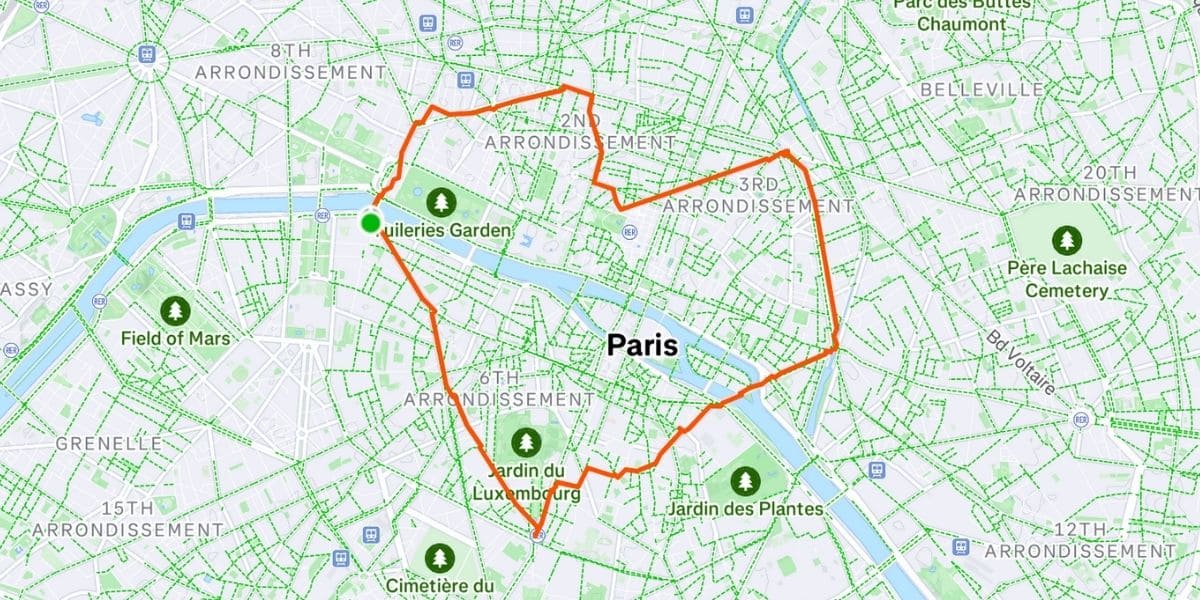
What can you create with a GPS art generator?
With a gps art generator, you’re not limited to boring loops or straight lines.
You can turn almost any idea into a GPS route that actually looks good once uploaded.
Here’s what people create most often.
Shapes and symbols
This is the classic entry point into GPS art.
You can create:
- hearts
- stars
- arrows
- simple emojis
These shapes work well because they’re:
- easy to recognize
- clean on the map
- readable even on short distances
A simple heart-shaped route of 3 to 6 miles already looks impressive on Strava. No need to overdo it.
Words and short messages
Want your map to say something?
That’s where GPS art gets really fun 😏
Common ideas:
- your name or initials
- short words like RUN, HI, YES
- inside jokes only your friends will get
With a gps art generator, letters are planned in advance, so they don’t end up distorted or unreadable. That’s almost impossible to achieve with live GPS tracking.
If you’ve ever wondered how people make these maps look so clean, our guide on how to fake your run and make it look real explains why planning the route first changes everything.
Logos and custom designs
This is where creativity goes up a level.
Some users create:
- logo-style routes
- abstract line art
- minimal geometric designs
These routes usually require:
- precise turns
- consistent spacing
- realistic distances
A gps art generator makes that possible without trial and error. You design once. You export once. You’re done.
Simple routes that still look intentional
GPS art doesn’t have to be complex.
Even a route that:
- draws a clean rectangle
- outlines a park
- follows a clear pattern
can look intentional and creative when it’s well designed.
That’s the real power of a gps art generator.
It doesn’t force you to be an artist.
It simply gives you control over the map.
And once you have that control, ideas come fast 😏
How a GPS art generator works
A gps art generator works in a simple but powerful way.
It separates route design from GPS tracking.
Instead of recording a run and hoping the map looks right, everything is planned first.
Here’s how it usually works.
You design the route before anything else
First, you decide what you want to draw:
- a shape
- a word
- a symbol
- or a clean, intentional route
The generator lets you control the path, street by street. That’s how GPS art stays readable and clean.
No random turns.
No broken lines.
The route is converted into a GPX file
Once the route is ready, the tool exports it as a GPX file.
This file contains:
- the GPS coordinates
- the full route geometry
- realistic distance data (in miles)
GPX files are the standard format used by most fitness apps. That’s why they’re so important for GPS art.
If you want a deeper explanation, our article about fake Strava maps explains how GPX files make planned routes possible across different apps.
You upload the GPX file to your fitness app
The last step is simple:
- upload the GPX file
- the app displays the route as a completed activity
- the map looks exactly like your design
No GPS drift.
No signal issues.
No surprises.
Why this method works so well for GPS art
Because everything is planned:
- shapes stay recognizable
- distances stay consistent
- routes look intentional, not accidental
That’s why GPS art created with a generator always looks cleaner than maps recorded live.
A gps art generator doesn’t fake effort.
It designs the route logic.
And for creative maps, that makes all the difference 😏
Why using a GPS art generator is better than doing it manually
Creating GPS art manually sounds fun…
until you actually try it.
Running around the city, checking your phone, hoping the GPS stays accurate, and realizing at the end that the shape looks nothing like what you planned.
That’s where the difference is obvious.
Manual GPS art means a lot of guesswork
When you try to draw GPS art by running:
- GPS signal can drift
- turns aren’t precise
- streets don’t always line up
- small mistakes ruin the whole shape
Even after 6, 8, or 10 miles, the result can still look messy.
And once it’s recorded, there’s no fixing it.
A gps art generator removes the randomness
With a gps art generator, everything is decided before the activity exists.
You get:
- a planned route
- clean angles and curves
- consistent spacing
- a predictable final map
No surprises when you upload it.
That’s exactly why many users move on from experimenting manually after reading guides like how to fake a Strava run and make it look real. Planning beats hoping. Every time.
You save time and energy
Manual GPS art takes:
- multiple attempts
- long distances
- a lot of patience
A gps art generator takes:
- one design
- one export
- one upload
You spend your time being creative, not correcting mistakes.
The result looks intentional
This is the biggest difference.
Manually recorded GPS art often looks:
- accidental
- uneven
- hard to read
GPS art generated from a GPX route looks:
- clean
- intentional
- designed
And on apps like Strava, that difference is obvious at first glance.
A gps art generator doesn’t replace creativity.
It removes friction.
And that’s why it wins.
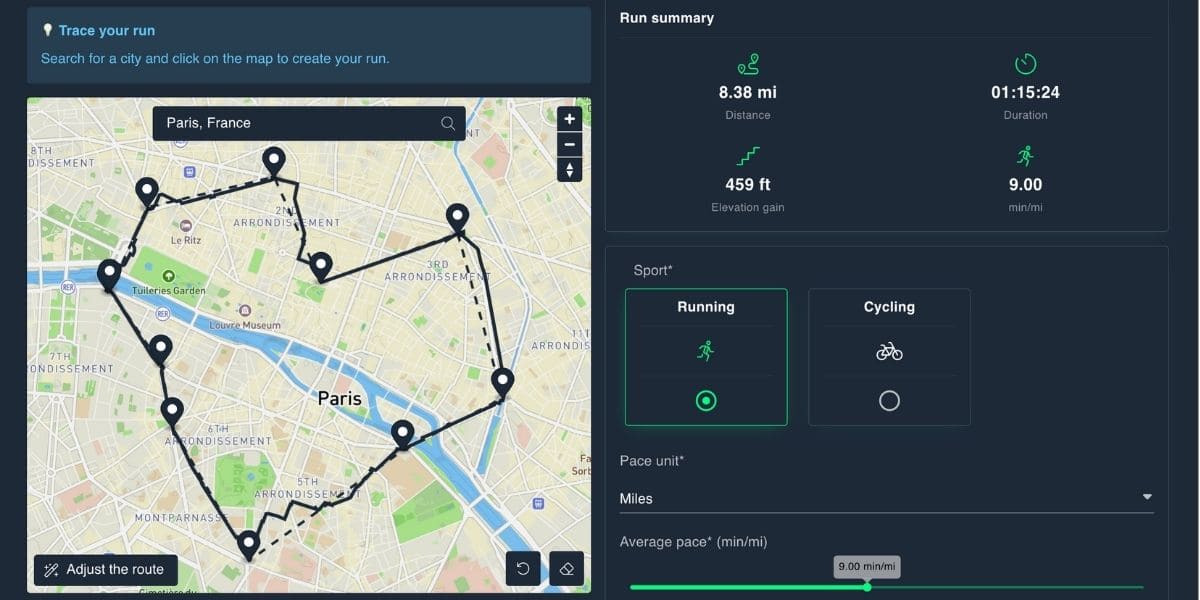
How to create GPS art routes with SimuRun
This is where ideas turn into actual maps 🧭
SimuRun works as a gps art generator focused on one thing:
creating realistic GPS routes that look good once uploaded.
No unnecessary complexity.
No technical headache.
Start with an idea
First, you decide what you want to create:
- a shape
- a word
- a symbol
- or a clean, intentional route
GPS art doesn’t need to be complex to be effective. Even simple designs can stand out when the route is well planned.
Turn the idea into a realistic GPS route
With SimuRun, the route is built digitally:
- following real streets and paths
- keeping distances realistic (in miles)
- avoiding impossible turns or jumps
That’s key.
A good GPS art route should look credible, not artificial.
Export the route as a GPX file
Once the route looks right, you export it as a GPX file.
This file contains:
- the full GPS route
- clean coordinates
- consistent distance data
It’s the format fitness apps understand instantly 📁
Upload and enjoy the result
After uploading the GPX file:
- the map appears exactly as designed
- the shape is readable
- the route looks intentional
No GPS drift.
No ugly surprises.
And once it’s live, the map does what GPS art does best:
it grabs attention 👀
What SimuRun is (and isn’t)
Just to keep things clear:
- SimuRun is made for fun, creativity, and testing
- it’s perfect for content, jokes, or visual routes
- it’s not meant for races or competitions
SimuRun doesn’t push you to run faster.
It helps you design better-looking routes 🎨
How to upload GPS art routes to Strava and other apps
Once your GPS art route is ready, the last step is easy 🔁
You just need to upload the GPX file to your fitness app.
Here’s how it works in practice.
Uploading a GPX file to Strava
On Strava, importing a GPX file is straightforward:
- open Strava on web or mobile
- choose Upload activity
- select File
- upload your GPX file
The activity appears with:
- the full route map
- the correct distance (in miles)
- a clean, readable shape
If you want more details, our guide on how to create a fake Strava map without running explains each step visually.
Uploading to other fitness apps
GPX files are widely supported, which makes GPS art flexible 👍
You can also upload your route to:
- Garmin Connect
- Komoot
- other apps that accept GPX imports
The process is similar:
- import the file
- preview the route
- save the activity
The map stays the same across platforms.
Tips for a clean upload
A few simple tips help your GPS art look its best:
- use clear route names
- keep distances realistic
- avoid impossible paths
- preview the map before saving
Small details make a big difference when the goal is visual impact 🎯
Once uploaded, your GPS art route is ready to be shared, screenshotted, or just admired.
And yes.
People will notice.
Tips to create eye-catching GPS art maps
A good GPS art map doesn’t need to be complex.
It needs to be clear, readable, and intentional 🧠
Here are a few simple tips that make a real difference.
Keep shapes simple
The cleaner the shape, the better it looks on the map.
- simple symbols > complex drawings
- short words > long sentences
- fewer turns = better readability
A heart or a word drawn over 3 to 6 miles is often more effective than a complicated design spread over long distances.
Choose realistic distances
GPS art looks best when the distance makes sense.
If the route is too short, the shape can feel cramped.
If it’s too long, the design becomes hard to read.
Staying within a reasonable mile range keeps the map believable and visually balanced.
Avoid impossible paths
A clean GPS art route should:
- follow real streets or paths
- avoid teleport jumps
- make logical turns
This is why planned GPX routes always look better than live GPS recordings.
Think about the final map view
Always imagine how the map will look after upload:
- zoomed out
- displayed on a phone screen
- seen at a glance
If the shape is readable in two seconds, it works 👌
Don’t overdo it
More detail doesn’t mean more impact.
The best GPS art maps are often:
- minimal
- balanced
- easy to recognize
When in doubt, simplify.
GPS art is visual storytelling.
And like any good story, clarity beats complexity.
Who should use a GPS art generator?
A gps art generator isn’t just for one type of user.
It’s for anyone who wants to do something different with GPS routes.
Here’s who usually gets the most out of it.
Strava users bored of stats
Not everyone opens Strava to chase pace or miles.
Some users just want:
- maps that stand out
- activities that spark comments
- something more fun than another loop
GPS art gives them that visual twist 🎨
Content creators and social media users
Creative maps work perfectly for:
- screenshots
- short videos
- before/after comparisons
One map.
One image.
Instant story.
That’s why GPS art often shows up in TikTok or Instagram content built around fitness apps 📱
People testing GPS watches and apps
A planned GPS route is also useful for:
- testing GPS display
- checking map rendering
- comparing platforms
People who love maps
Some people just enjoy:
- clean lines
- well-designed routes
- visual patterns
GPS art turns GPS data into something aesthetic. No running required.
Friends who like to joke around
Let’s be honest.
GPS art is also great for:
- harmless jokes
- inside references
- surprising friends with a map they don’t expect 😄
As long as it stays fun and ethical, it’s all part of the game.
If you enjoy creativity more than competition, a gps art generator is probably made for you.
🏁 Conclusion: turn any idea into GPS art in minutes
A gps art generator changes the way you look at GPS routes.
Instead of:
- repeating the same loops
- chasing numbers
- hoping a map looks interesting
You get:
- creative control
- clean, intentional routes
- maps people actually notice
GPS art isn’t about running faster or going farther.
It’s about turning GPS data into something visual, fun, and shareable 🧩
With the right tool, you don’t need:
- perfect GPS signal
- hours of trial and error
- endless miles on the road
You just need an idea.
SimuRun lets you create realistic GPS art routes, export them as GPX files, and upload them to your favorite fitness apps in minutes. Simple, clean, and designed for creativity.
No competitions.
No leaderboard tricks.
Just smart route design and good-looking maps.
Ready to draw your next route?
👉 Try SimuRun and create your first GPS art route today.
Simulate. Create. Share. 🚀